

Yeah that’s an intentional typo. Sue me. It’s akshooalee SERIALIZATION.
Stupid me decided that serialization of a swath of objects in a game program was one of the later efforts I should undertake. PowerShell makes serialization/deserialization dirt simple, but it’s a feature I don’t see used too often (you know, because my PowerShell world is so large). Hence, I bring to you an exposition the likes of which you’ve never seen.
Cereal Is Good
Let’s start with the obvious: what in the world is serialization and deserialization?
By definition, serialization is the process of taking some collection of data and bundling it up into some package (I worded this extremely carefully). Deserialization, then, is the reverse: expanding data from some previously build package. To be clear, cereal-ization is the process of transmuting some object into a delicious bowl of cereal of your choosing.
Note I worded the definition of serialization carefully. This is because it doesn’t concern itself with data context, which can be a crucial distinction when building save/load implementations. Further, regarding the so-called “package”, whatever format the data are expressed in as a result of the serialization process, it needs to be reversible (deserialization). “Package” may be a bit of a misnomer, but the analogy here is putting data into a box for storage to be retrieved later. Considering video game save/load functionality prima facie, this seems obvious. However, it doesn’t betray exactly how to accomplish this. We know data needs to be summarized and stored somewhere accessible, and that it needs easily retrieved and used on-demand, but how do we do this?
The code that handles this process looks different between languages. We’ll be focusing on PowerShell here, but be aware that this won’t have a strict 1:1 mapping if you’re using another language (even C#). We’re also using native PowerShell, no additional modules.
Context (We Won’t Ignore It)
I’m going to put here an entire PowerShell program I’m using to test a questing subsystem, but it includes functions for saving/loading data state. It’s just south of 400 lines of code, but we’ll be sure to summarize and cover the portions that are germane to our topic at hand.
using namespace System
using namespace System.Collections.Generic

Set-StrictMode -Version Latest

Class PlayerGlobalStats {
    [Int]$Gold
    [List[[Object]]]$ItemInventory

    PlayerGlobalStats() {
        $this.Gold = 500
        $this.ItemInventory = [List[[Object]]]::new()
    }
}

Class QuestContext {
    [Object]$PlayerStats
    [Object]$PlayerParty
    [Object]$CurrentEnemyParty

    QuestContext(
        [Object]$PlayerStats,
        [Object]$PlayerParty,
        [Object]$CurrentEnemyParty
    ) {
        $this.PlayerStats = $PlayerStats
        $this.PlayerParty = $PlayerParty
        $this.CurrentEnemyParty = $CurrentEnemyParty
    }
}
[QuestContext]$Script:TheQuestContext = [QuestContext]::new(
    [PlayerGlobalStats]::new(),
    $null,
    $null
)

Class QuestStep {
    [String]$Description
    [Boolean]$IsComplete
    [ScriptBlock]$CompletionCheck

    QuestStep() {
        $this.Description = ''
        $this.IsComplete = $false
        $this.CompletionCheck = $null
    }
}

Class QSNone : QuestStep {
    QSNone() : base() {
        $this.Description = 'None Quest - Does nothing'
    }
}

Class QSPlayerHasGold : QuestStep {
    [Int]$RequiredGold

    QSPlayerHasGold(
        [String]$Description,
        [Int]$RequiredGold
    ) : base() {
        $this.Description = $Description
        $this.RequiredGold = $RequiredGold

        $this.CompletionCheck = {
            Param(
                [QSPlayerHasGold]$Self,
                [QuestContext]$Context
            )

            If($Context.PlayerStats.Gold -GE $Self.RequiredGold) {
                $Self.IsComplete = $true
            }
        }
    }
}

Class Quest {
    [String]$Name
    [List[[QuestStep]]]$Steps
    [Boolean]$IsComplete

    Quest(
        [String]$Name
    ) {
        $this.Name = $Name
        $this.Steps = [List[[QuestStep]]]::new()
        $this.IsComplete = $false
    }

    [Void]AddStep(
        [QuestStep]$Step
    ) {
        $this.Steps.Add($Step)
    }

    [Single]GetCompletionPercentage() {
        If($this.Steps.Count -EQ 0) {
            Return 0.0
        }

        [Int]$CompletedCount = 0
        Foreach($Step in $this.Steps) {
            If($Step.IsComplete -EQ $true) {
                $CompletedCount++
            }
        }

        Return (([Single]$CompletedCount / $this.Steps.Count)) * 100.0
    }

    [Void]Update(
        [Single]$DeltaTime
    ) {}
}

Class LinearQuest : Quest {
    [Int]$CurrentStepIndex

    LinearQuest(
        [String]$Name
    ) : base($Name) {
        $this.CurrentStepIndex = 0
    }

    LinearQuest(
        [String]$Name,
        [QuestStep[]]$Steps
    ) : base($Name) {
        $this.CurrentStepIndex = 0

        If($Steps) {
            Foreach($Step in $Steps) {
                $this.AddStep($Step)
            }
        }
    }

    [Void]Update(
        [Single]$DeltaTime
    ) {
        If($this.Steps[$this.CurrentStepIndex]) {
            # RUN THE COMPLETION CHECK AGAINST THE CURRENT STEP
            If($this.Steps[$this.CurrentStepIndex].CompletionCheck) {
                & $this.Steps[$this.CurrentStepIndex].CompletionCheck `
                    $this.Steps[$this.CurrentStepIndex] `
                    $Script:TheQuestContext
            }

            If($this.Steps[$this.CurrentStepIndex].IsComplete -EQ $true) {
                $this.CurrentStepIndex++

                If($this.CurrentStepIndex -GE $this.Steps.Count) {
                    $this.IsComplete = $true
                }
            }
        }
    }
}

Class NonLinearQuest : Quest {
    NonLinearQuest(
        [String]$Name
    ) : base($Name) {}

    NonLinearQuest(
        [String]$Name,
        [QuestStep[]]$Steps
    ) : base($Name) {
        If($Steps) {
            Foreach($Step in $Steps) {
                $this.AddStep($Step)
            }
        }
    }

    [Void]Update(
        [Single]$DeltaTime
    ) {
        Foreach($Step in $this.Steps) {
            If($Step.CompletionCheck) {
                & $Step.CompletionCheck $Step $Script:TheQuestContext
            }
        }
        $this.CheckIfQuestIsComplete()
    }

    [Void]CheckIfQuestIsComplete() {
        Foreach($Step in $this.Steps) {
            If($Step.IsComplete -EQ $false) {
                Return
            }
        }

        $this.IsComplete = $true
    }
}

Class Questline {
    [String]$Name
    [List[[Quest]]]$Quests

    Questline(
        [String]$Name
    ) {
        $this.Name = $Name
        $this.Quests = [List[[Quest]]]::new()
    }

    Questline(
        [String]$Name,
        [Quest[]]$Quests
    ) {
        $this.Name = $Name
        $this.Quests = [List[[Quest]]]::new()

        If($Quests) {
            Foreach($Quest in $Quests) {
                $this.AddQuest($Quest)
            }
        }
    }

    [Void]AddQuest(
        [Quest]$Quest
    ) {
        $this.Quests.Add($Quest)
    }
}

Class QuestManager {
    [List[[Questline]]]$Questlines

    QuestManager() {
        $this.Questlines = [List[[Questline]]]::new()
    }

    QuestManager(
        [Questline[]]$Questlines
    ) {
        $this.QuestLines = [List[[Questline]]]::new()

        If($Questlines) {
            Foreach($Questline in $Questlines) {
                $this.AddQuestline($Questline)
            }
        }
    }

    [Void]AddQuestline(
        [Questline]$Questline
    ) {
        $this.Questlines.Add($Questline)
    }

    [Questline]GetQuestlineByName(
        [String]$QuestlineName
    ) {
        Foreach($Questline in $this.Questlines) {
            If($Questline.Name -EQ $QuestlineName) {
                Return $Questline
            }
        }

        Return $null
    }
}

Class GameContext {
    [Object]$QuestManager
    [Object]$QuestContext

    GameContext(
        [Object]$QuestManager,
        [Object]$QuestContext
    ) {
        $this.QuestManager = $QuestManager
        $this.QuestContext = $Script:TheQuestContext
    }
}

Class GameCore {
    [Boolean]$Running
    [GameContext]$TheGameContext

    GameCore() {
        $this.Running = $true

        If((Test-Path -Path ./GameSave.xml)) {
            $Deserialized = Import-CliXml -Path ./GameSave.xml
            $this.TheGameContext = [GameContext]::new(
                $Deserialized.QuestManager,
                $Deserialized.QuestContext
            )
        } Else {
            # THIS WOULD BE THE INITIAL SETUP IF A PREVIOUS GAME
            # SAVE WASN'T FOUND OR IF THE PLAYER STARTED
            # A NEW GAME.
            $this.TheGameContext = [GameContext]::new(
                [QuestManager]::new(@(
                    [Questline]::new(
                        'MainStoryQuestline',
                        @(
                            [LinearQuest]::new(
                                'StartingOffQuest',
                                @(
                                    [QSNone]::new()
                                )
                            )
                        )
                    ),
                    [Questline]::new(
                        'GrannysKittySavedQuestline',
                        @(
                            [NonLinearQuest]::new(
                                'GrannyLostKittyQuest',
                                @(
                                    [QSNone]::new()
                                )
                            ),
                            [NonLinearQuest]::new(
                                'GrannyCookedTheKittyQuest',
                                @(
                                    [QSNone]::new()
                                )
                            )
                        )
                    ),
                    [Questline]::new(
                        'CookedBaconQuestline',
                        @(
                            [LinearQuest]::new(
                                'ObtainBaconQuest',
                                @(
                                    [QSNone]::new()
                                )
                            ),
                            [LinearQuest]::new(
                                'CookBaconQuest',
                                @(
                                    [QSNone]::new()
                                )
                            )
                        )
                    ),
                    [Questline]::new(
                        'TurnComputerOnQuestline',
                        @(
                            [NonLinearQuest]::new(
                                'LocatePowerButtonQuest',
                                @(
                                    [QSNone]::new()
                                )
                            )
                        )
                    )
                )),
                $Script:TheQuestContext
            )

            If(-NOT (Test-Path -Path ./GameSave.xml)) {
                Export-CliXml -Depth 50 -InputObject $this.TheGameContext -Force -Path ./GameSave.xml
            }
        }
    }
}

[GameCore]$TheGameCore = [GameCore]::new()
Our focus for this code needs to be on several classes:
PlayerGlobalStatsQuestContext(consequently the script-level instance namedTheQuestContext)GameContextGameCore
The other classes will fall into place as we go forward. The justification for focus is as follows:
PlayerGlobalStatscontains data that we’ll mutate on multiple passes to prove, amongst other vectors, that deserialization is working. This just happens to be a far more obvious proof than others.QuestContextholds references to objects that are themselves deep. There are implications about how to serialize based on object composition complexity, which I’ll demonstrate. The actual use case for aQuestContextinstance for the questing subsystem isn’t important for this conversation.GameContextis a Context Aggregator. For the purposes of this demonstration, it acts as the target of serialization/deserialization.GameCoreis the highest-order governor object that will perform the action of serializing/deserializing. It also handles a base case when the program context hasn’t yet been serialized by initializing state to an ideal base.
It should go without saying at this point, but I’ll mention it anyway. In this demonstration, we’re not dealing with multiple fixed save vectors. Instead, we’re using only one called “GameSave“. In the implementation for a game program that wanted to use multiple fixed save vectors, you’d do things a bit differently, but the principle actions remain the same.
Drinking the Milk Before Eating the Cereal
Starting from the bottom of the code, we see the program starts with the instantiation of a new GameCore instance. This passes us immediately into the GameCore default constructor. By this point, PowerShell has parsed and loaded in all class definitions. The GameCore class has two members: Running (Boolean) and TheGameContext (GameContext). Running, in this example, serves no purpose. In actual game programs, it’s used as a governor for the main game loop.
The default constructor first sets Running to true (again, pointless here), then moves into the meat and potatoes of the save/load process. A branch is defined that checks if the file “GameSave.xml” exists in the current working directory. If it does, we branch into a deserialization of that file (more on this in a moment). Otherwise, we branch into a so-called “base case”. The assumption here is that this is either (A) the user has started a new game, (B) whacked the save file, (C) relocated the save file to an unexpected location, or (D) the save file has been corrupted somehow. The code doesn’t properly account for all these potential outcomes, so just recognize that this branch occurs simply if the save file is missing from the current working directory.
If the “base case” branch is encountered, the default constructor will manually create a brand new GameContext instance, which in turn creates a new, fully populated QuestManager, and passes in the script-level instance of QuestContext for further data visibility. If this seems strange, remember (or know) that the whole idea of the Context Pattern is that we take advantage of reference semantics to effectively describe what would otherwise be disparate portions of a well-encapsulated program, hence the moniker “context”. If this still isn’t hitting the mark, it’ll hopefully land a little closer shortly. Once the new GameContext instance is initialized, a somewhat duplicitous check against the existence of the GameSave.xml file is made (this is meant to be defensive, interdicting an exceptional state). If it doesn’t exist, we serialize the member TheGameContext to the file GameSave.xml.
How to Put Soggy Cereal Back in the Box
Finally diving into the power of the shell, we can examine what options we have available in PowerShell to pull this off. Because PowerShell has established well-known verb-noun vernacular, we can take a look at some obvious commands in the Export-/Import- space, as well as the ConvertTo-/ConvertFrom- space.


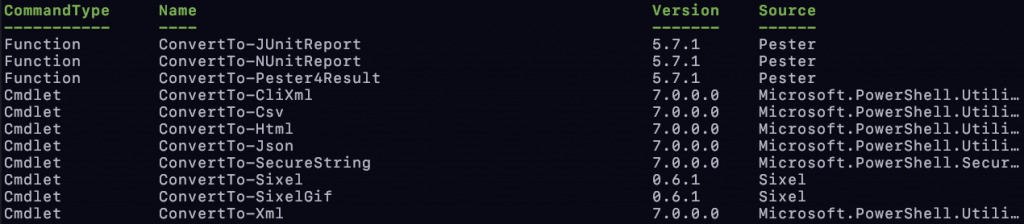

There’s really only two -Noun cmdlets we’re wanting to take a look at here, and that’s -Json and -CliXml. The major difference between the ConvertX- cmdlets and the Import-/Export- cmdlets is the former will want to output a string in the invocation site, whereas the latter will read/write to a file of your choosing at the invocation site. The implication here being that use of ConvertX- will, if you want the content to be in a file (which we do), require you pipe the output to Out-File as a matter of pattern:
ConvertTo-CliXml -InputObject $SomeObject | Out-File -Path ./SomeSaveFile.xml
This can be simplified by using the Export- cmdlet:
Export-CliXml -InputObect $SomeObject -Path ./SomeSaveFile.xml
Literally the same outcome, just less code and no explicit piping. You can see this pattern used in the code above.
As to the difference between JSON and CliXML, this boils down to (A) personal preference, (B) religion, and (C) how much lift you want to do on your part. JSON is what all the hip and cool kids will likely want to use, which is fine. The caveat is that when you deserialize JSON, you typically need something smelling like a Factory Pattern or a Builder Pattern with a lot of manual transposing. CliXML, for all its brutal ugliness, deserializes a bit easier and the size of the serialized output can be smaller. You can see this in use in the code snippet above.
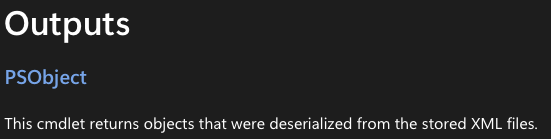
Serializing the data is performed with the Export-CliXml cmdlet. Its invocation here is pretty straightforward, maybe except for the Depth parameter. Microsoft’s documentation defines this parameter as follows:
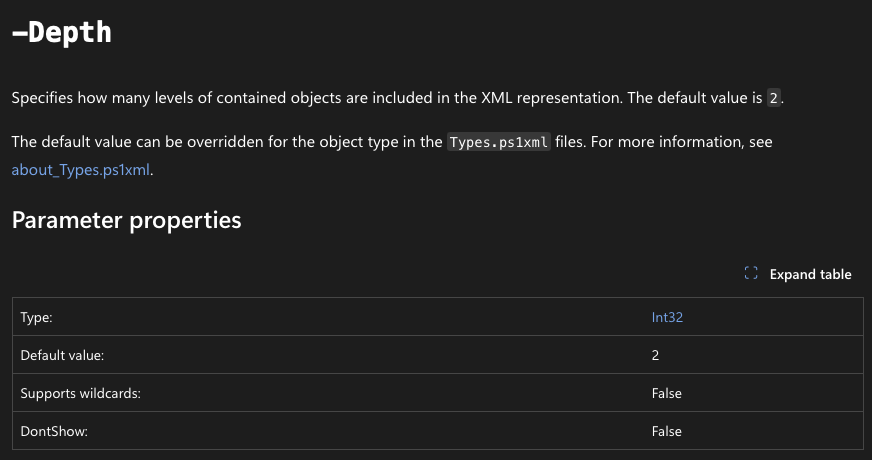
Now this seems plain obvious, but what does it really mean?
The invocation above is going to serialize the TheGameContext member, which is of type GameContext. Looking at its definition, it has two members: QuestManager and QuestContext. QuestContext has three members in its definition: PlayerStats, PlayerParty, and CurrentEnemyParty. The PlayerStats member, while defined as type Object, is assigned to an instance of PlayerGlobalStats, which has two members: Gold and ItemInventory, the latter of which is a List<Object>. QuestManager is an extremely deep composition of Questlines, which are a composition of Quests, which are compositions of QuestSteps… This gets really heady, really fast. With this kind of topology, if you’re not careful, you’re not getting all the data you need, and this is where depth traversal comes into play. Say we exported the TheGameContext member with the default 2 layer depth traversal. Here’s what we would end up with:

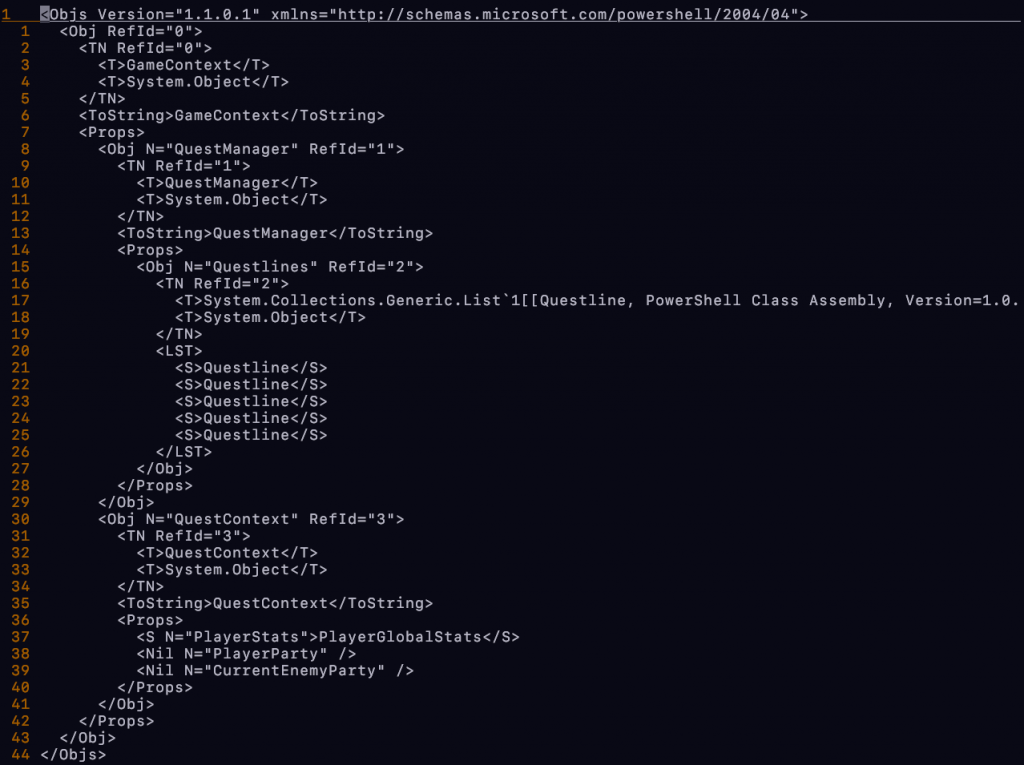
Again, setting aside the fact that CliXML isn’t anything pretty to look at, if you read this carefully, you’ll notice we’re missing quite a bit of data here. Line 6 shows we got our GameContext object (TheGameContext). We see the two members of type QuestManager (8) and QuestContext (30). It also got that the QuestManager‘s Questlines member is a List<Questlines>, and has five Questline instances in it (17, 20), and that all the members of the QuestContext class were captured, but none of the specific data from any of those lowest-level members was retained. We can verify this by manually importing the data and inspecting the results:
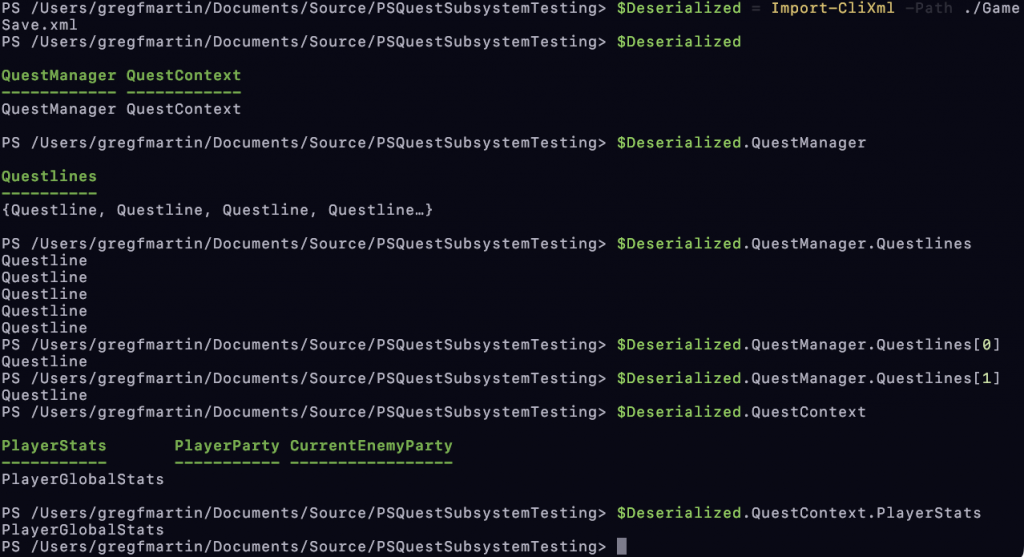
This is completely unusable. However, if we set the depth traversal to something ridiculous, like 50 (because who gives a shit), we get something a wee bit different:

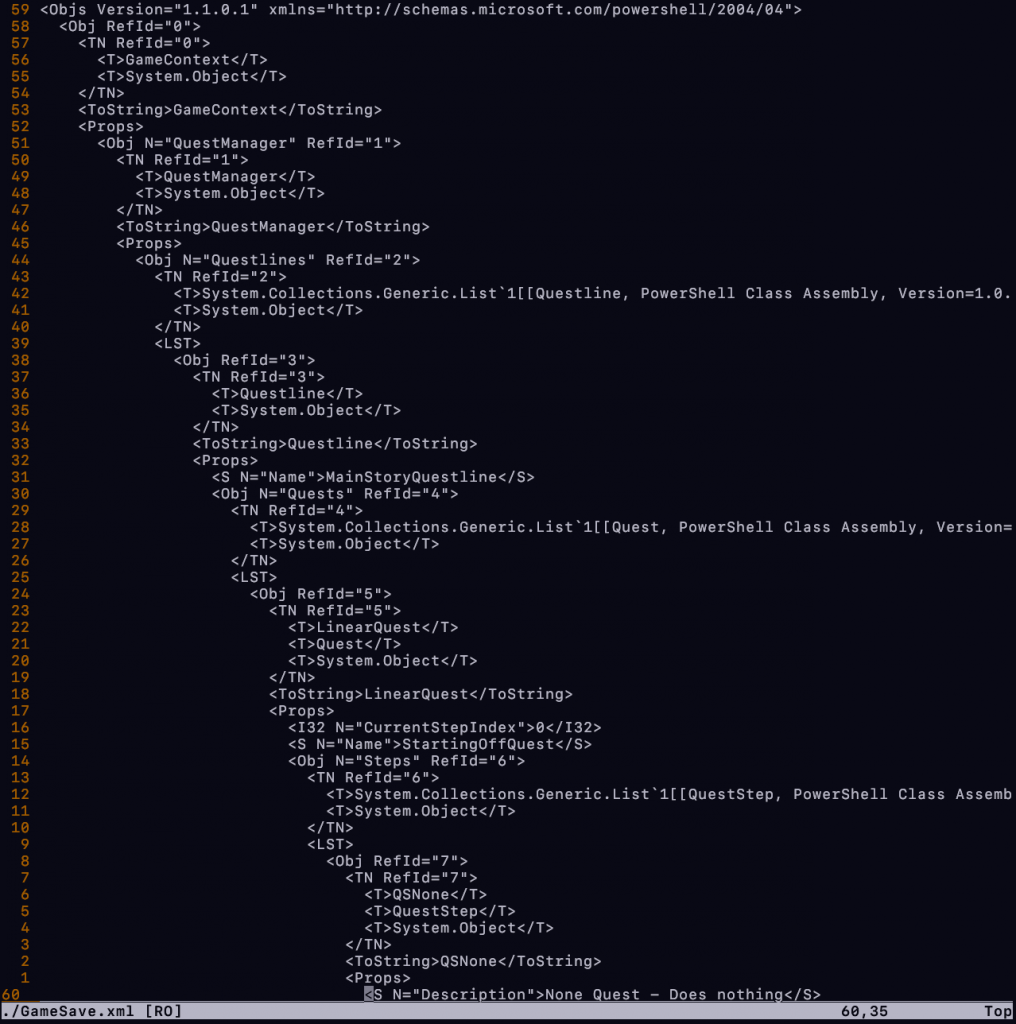
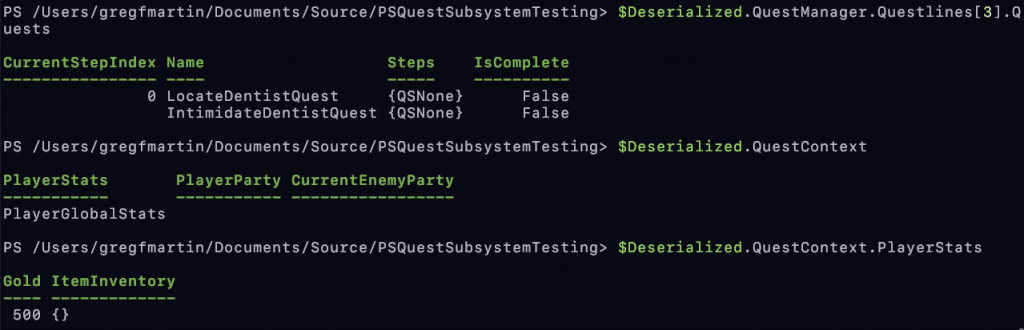
This looks hella better.
… Except for one small thing. Did you notice it?
Why is the output of Import-CliXml being captured? How come you can’t just assign it directly?

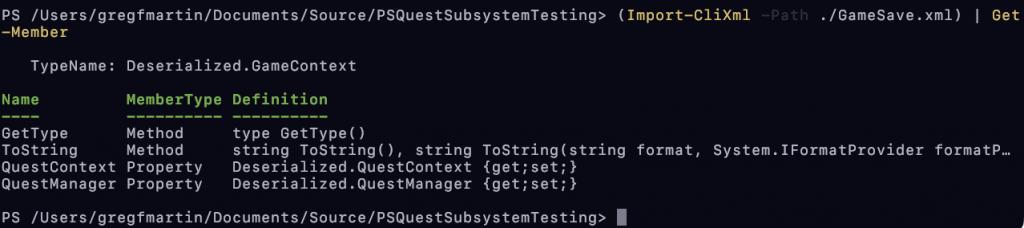
I still haven’t quite wrapped my head around this one, but it would seem that the result of Import-CliXml is a PSObject of type Deserialized.<SerializedObjectName>.
Further, PowerShell really isn’t happy about type cast attempts either:

There could be a few ways to work with this, but to save what little brain cells I actually have left, I decided that because the members of the Deserialized class were already fully populated members from my own class definitions, I could just use a secondary constructor for the GameContext class that takes appropriate parameters to initialize itself with
So there we have it. We take complex data structures, bundle them up all nice and neat, and then pull them back out just the same as we found them. If you feel so inclined to JSON it up, have fun. Jason and I aren’t frans ATM.
Leave a Reply