
Once again, it’s time we dive into some PowerShell insanity. Just look how happy I am in the above image about this topic! I’d also like to thank Gemini for proving yet again why AI shouldn’t be allowed to spell words. What in the absolute hell is in that image?
A properly asinine and overly verbose article about the theory and principles behind operator overloading is in the works, so stay tuned for that. In the mean time, you get this: an equally asinine and mostly useless adventure into doing some rather extreme things with PowerShell that 98.999% of people won’t ever use it for. I’ll offer a very brief introduction to what operator overloading is to get started.
Considering arithmetic expressions, we all understand what this means:
1 + 1We’re adding two integers together. Assuming PowerShell hasn’t taken Spring Break and gotten smashed, it should respond with 2. Now, let’s look at an expression that’s technically legal but looks dumb AF:
'a' + 5You’d think this wouldn’t work, but in PowerShell, it does. The interpreter first performs a type cast on the integer on the right side of the addition operator, then performs a string concatenation to yield a5. Another one:
'a' * 5Again, if you’re in your right mind, you should be gouging your eyeballs out, but this simply repeats the string on the left side of the multiplication operator the number of times of the integer on the right side to yield aaaaa. That said, let’s finally examine a somewhat bizarre expression that violates the commutative property of addition (not that those rules mattered anymore anyway):
5 + 'a'After seeing the cancer above, you’d think this would yield the string 5a, but you’d be wrong:
InvalidArgument: Cannot convert value "a" to type "System.Int32". Error: "The input string 'a' was not in a correct format."An intuitive reading of this exception betrays what the addition operator, and virtually any operator for that matter (context depending), is doing behind the scenes. They map to functions that handle the operation for you. And, just like any proper function, they can be overloaded to do whatever you want them to do. It’s like bending the world to your will.
Operator overloading sees extensive use in abstract data types where you want to use instances of them in expressions in a “natural” way. As you maybe gleaned earlier, the String class provides some operator overloads to do somewhat, or perhaps not, intuitive actions. They’re better discussed with an example, so let’s look at a custom PowerShell class that clamps an integer (don’t start on me, I know there are more idiomatic ways to pull this off, shut your face). We want this class to behave as close to natively as possible when using both arithmetic and comparison operators:
using namespace System

Set-StrictMode -Version Latest

###############################################################################
#
# CLAMPABLE INT
#
# CLAMPS THAT INT, GURL!
#
###############################################################################

Class ClampableInt : IComparable {
    [Int]$Value
    [Int]$Floor
    [Int]$Ceiling

    ClampableInt() {
        $this.Value = 0
        $this.Floor = 0
        $this.Ceiling = 0
    }

    ClampableInt(
        [Int]$Value,
        [Int]$Floor,
        [Int]$Ceiling
    ) {
        $this.Value = $Value
        $this.Floor = $Floor
        $this.Ceiling = ($Ceiling -LE $Floor) ? ($Floor + 1) : $Ceiling
    }

    [Void]SetValue(
        [Int]$Value
    ) {
        $this.Value = [Math]::Clamp($this.Value, $this.Floor, $this.Ceiling)
    }

    [Boolean]Equals(
        [Object]$Other
    ) {
        If($null -EQ $Other -OR ($Other.GetType() -NE $this.GetType())) {
            Return $false
        }

        Return ($this.Value -EQ ($Other -AS [ClampableInt]).Value)
    }

    [Int]GetHashCode() {
        Return (
            $this.Value.GetHashCode() -BXOR
            $this.Floor.GetHashCode() -BXOR
            $this.Ceiling.GetHashCode()
        )
    }

    [Int]CompareTo(
        [Object]$Other
    ) {
        If($null -EQ $Other) {
            Return 1
        }

        Return $this.Value.CompareTo(([ClampableInt]$Other).Value)
    }

    Hidden Static [ClampableInt]op_Addition(
        [ClampableInt]$Left,
        [ClampableInt]$Right
    ) {
        Return [ClampableInt]::new(
            [Math]::Clamp(($Left.Value + $Right.Value), $Left.Floor, $Left.Ceiling),
            $Left.Floor,
            $Left.Ceiling
        )
    }

    Hidden Static [ClampableInt]op_Subtraction(
        [ClampableInt]$Left,
        [ClampableInt]$Right
    ) {
        Return [ClampableInt]::new(
            [Math]::Clamp(($Left.Value - $Right.Value), $Left.Floor, $Left.Ceiling),
            $Left.Floor,
            $Left.Ceiling
        )
    }

    Hidden Static [ClampableInt]op_Multiply(
        [ClampableInt]$Left,
        [ClampableInt]$Right
    ) {
        Return [ClampableInt]::new(
            [Math]::Clamp(($Left.Value * $Right.Value), $Left.Floor, $Left.Ceiling),
            $Left.Floor,
            $Left.Ceiling
        )
    }

    Hidden Static [ClampableInt]op_Division(
        [ClampableInt]$Left,
        [ClampableInt]$Right
    ) {
        Return [ClampableInt]::new(
            [Math]::Clamp(($Left.Value / $Right.Value), $Left.Floor, $Left.Ceiling),
            $Left.Floor,
            $Left.Ceiling
        )
    }
}
There’s a bit going on with this class, so let’s take a moment to briefly dissect it:
- Line 17 –
ClampableIntexplicitly implements theIComparableinterface. We conform to this interface on line 62. This is so we can use aClampableIntinstance directly in a comparison operator (but is alone insufficient as we’ll see later). - Line 44 – We override the
Equalsmethod, provided by the implicitly inheritedObjectclass that every .NET class inherits from. - Line 54 – Since we’ve overridden the
Equalsmethod, we need to override theGetHashCodemethod as well. This is used in some comparison logic, most obviously in containers sensitive to data hashes to identify collisions. - Line 74:116 – Here starts the fun overloads. We overload the addition, subtraction, multiplication, and division operators. We’ll address them in detail later, and add a few others to make things interesting.
Meat and PO-TAY-TOES
I’m greatly resisting the urge to go super deep on how operator overloading works, especially in the context of PowerShell. Doing so will muddy already very swampy water, so there are aspects we’re going to accept prima facie:
- Operator overload definitions needn’t be hidden per-se, but we make them so as a way of enforcing the idea that this is plumbing under plumbing.
- That said, those definitions do need to be static. This is a requirement by the interpreter (consequently the Intermediate Language (IL)).
- They also must return values typed as the class they belong to.
- The names of the methods must overload an IL-specific identifier for the operator. The metadata names for the operator methods can be found in a table on this page: https://learn.microsoft.com/en-us/dotnet/standard/design-guidelines/operator-overloads.
- There’s no easy way to get around this so here goes: the number of parameters each overload method requires is relative to the operator you’re overloading. This implies some understanding about the difference between a unary and a binary operator; the former requiring one operand/parameter, the latter requiring two; and operand position in an expression (strict adherence to their respective mathematical properties notwithstanding). In the cases of addition, subtraction, multiplication, and division, they’re all binary operators, ergo needing two operands, and we are, in this context, sensitive to operand position in an expression (left side or right side of the operator). As far as I can tell, Microsoft offers no explicit documentation on what the function signatures should be for permissible operator overloads (there are some which can’t be), hence my recommendation that you understand syntax concretely, such that auguring needed parameters would be obvious.
- The data types for the parameters to these methods are of the same type as the class. As we’ll see later, at least for binary operators, you can at most use a different data type for the second parameter, but the first must always be the same as the class.
- Finally, as illustrated on line 118, unary overloads require only one parameter and it must be of the same type as the class. The data type it returns will vary depending on the effect you want from the use of the unary operator on instances of the class in expressions.
There are, of course, subtle variations to each rule I’ve laid down here, but following these will be enough to get you started. Let’s step through an addition operation on two ClampableInt instances. We’ll do this via a really bad Pester test and the PowerShell Debugger:
using namespace System

Set-StrictMode -Version Latest

BeforeAll {
    . "$($PSScriptRoot)/ClampableInt.ps1"
}

Context 'Addition Operator Overload' {
    It 'Adds two ClampableInt instances together' {
        [ClampableInt]$A = [ClampableInt]::new(5, 5, 10)
        [ClampableInt]$B = [ClampableInt]::new(5, 5, 10)

        ($A + $B).Value | Should -Be 10
    }
}
We set a breakpoint at the first statement in the It block (line 11), and invoke Pester:

The first statement is hit and creates a new instance of ClampableInt named $A with sane values.

The next statement is hit and creates a new instance of ClampableInt named $A with similar values as $A.

We finally come to the critical statement. We have a nested expression $A + $B, which is saying we’re adding two ClampableInt instances together. We capture this and get the Value property off it. This is what we assert should be 10 as a result of the addition. Let’s dive into the next step to see what happens:
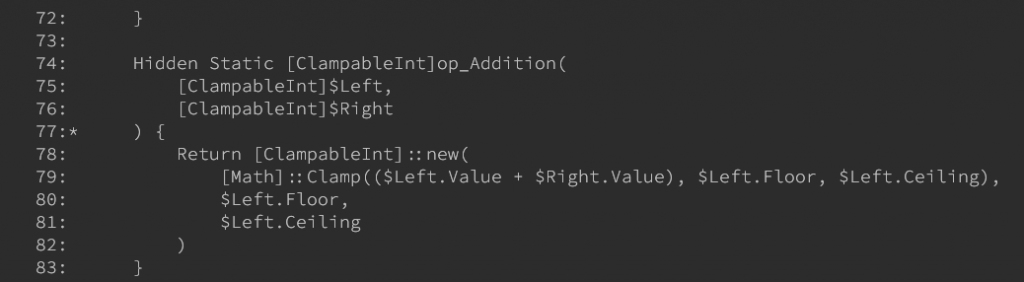
The debugger has now stepped into the op_Addition method overload we defined in the ClampableInt class. As written, it’ll return a new ClampableInt instance that adds the values of $Right.Value to $Left.Value while still retaining the clamping rules enforced by the [Math]::Clamp static method. Preference is given to the $Left operands properties. Going back to the test statement in the Pester Test, ($A + $B), the value of $Left is $A and the value of $Right is $B. Finally, we tell the debugger to continue to produce our result:

Let’s update the Pester Test to target all the the operators we overloaded:
BeforeAll {
    . "$($PSScriptRoot)/ClampableInt.ps1"
}

Context 'Addition Operator Overload' {
    It 'Adds two ClampableInt instances together' {
        [ClampableInt]$A = [ClampableInt]::new(5, 5, 10)
        [ClampableInt]$B = [ClampableInt]::new(5, 5, 10)

        ($A + $B).Value | Should -Be 10
    }
}

Context 'Subtraction Operator Overload' {
    It 'Subtracts two ClampableInt instances' {
        [ClampableInt]$A = [ClampableInt]::new(5, 0, 10)
        [ClampableInt]$B = [ClampableInt]::new(5, 5, 10)

        ($A - $B).Value | Should -Be 0
    }
}

Context 'Multiplication Operator Overload' {
    It 'Multiplies two ClampableInt instances' {
        [ClampableInt]$A = [ClampableInt]::new(5, 5, 10)
        [ClampableInt]$B = [ClampableInt]::new(2, 5, 10)

        ($A * $B).Value | Should -Be 10
    }
}

Context 'Division Operator Overload' {
    It 'Divides two ClampableInt instances' {
        [ClampableInt]$A = [ClampableInt]::new(10, 5, 10)
        [ClampableInt]$B = [ClampableInt]::new(2, 5, 10)

        ($A / $B).Value | Should -Be 5
    }
}
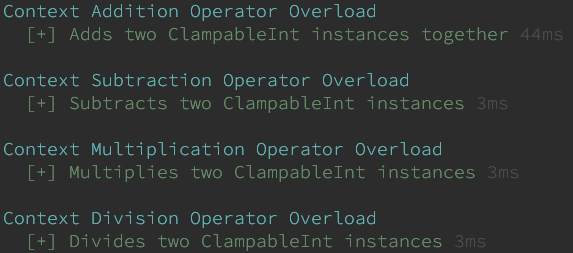
And the result:
Okay, this is fancy, but what if we wanted to add an integer to a ClampableInt instance? Let’s augment our Pester test to include such a test:
Context 'Addition Operator Overload' {
    It 'Adds two ClampableInt instances together' {
        [ClampableInt]$A = [ClampableInt]::new(5, 5, 10)
        [ClampableInt]$B = [ClampableInt]::new(5, 5, 10)

        ($A + $B).Value | Should -Be 10
    }

    It 'Adds an integer to a ClampableInt' {
        [ClampableInt]$A = [ClampableInt]::new(5, 5, 10)
        [Int]$B = 15

        ($A + $B).Value | Should -Be 10
    }
}And now let’s run Pester:

Big oof.
But, as is the case with all exceptions, if the context is well understood, it signals what the issue is. Our response to this expression is a PSInvalidCastException. PowerShell couldn’t cast an integer type to the ClampableInt type. To correct this, let’s retrofit the ClampableInt class with another operator overload:
# ... Code omitted for brevity

    Hidden Static [ClampableInt]op_Addition(
        [ClampableInt]$Left,
        [Int]$Right
    ) {
        Return [ClampableInt]::new(
            [Math]::Clamp(($Left.Value + $Right), $Left.Floor, $Left.Ceiling),
            $Left.Floor,
            $Left.Ceiling
        )
    }

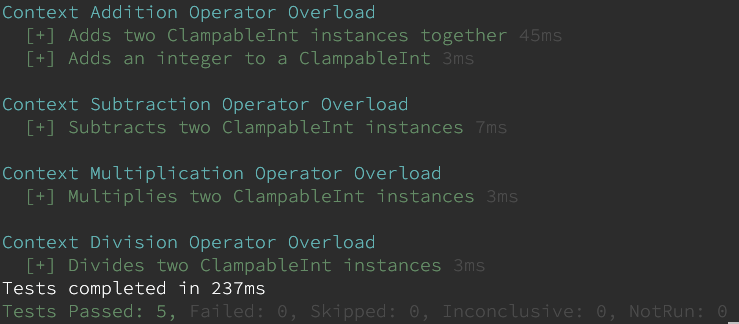
# ... Code omitted for brevityIn this particular overload, we specify a data type of Int for the second parameter. Now that we have a valid method to handle that kind of expression, we can rerun our Pester test to see the results:
To further drive the point home, and to demonstrate just how much of an asshole we really can be about this, let’s permit adding a String to a ClampableInt. I’m not going to go through the work of handling alphabetic characters, opting instead to rely on built-in exception mechanisms for that. This will work if you place a number in a string and try to add it to a ClampableInt. First we add yet another addition operator overload:
# ... Code omitted for brevity

    Hidden Static [ClampableInt]op_Addition(
        [ClampableInt]$Left,
        [String]$Right
    ) {
        Return [ClampableInt]::new(
            [Math]::Clamp(($Left.Value + [Int]::Parse($Right)), $Left.Floor, $Left.Ceiling),
            $Left.Floor,
            $Left.Ceiling
        )
    }

# ... Code omitted for brevityThen we add another Pester test:
# ... Code omitted for brevity

    It 'Adds a number in a string to a ClampableInt' {
        [ClampableInt]$A = [ClampableInt]::new(5, 5, 10)
        [String]$B = '15'

        ($A + $B).Value | Should -Be 10
    }

# ... Code omitted for brevityAnd the Pester result:
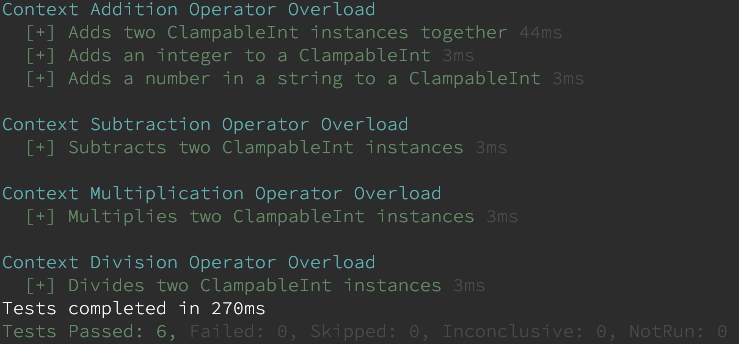
To extend the same functionality to the other three operator overloads, you only need write similar overload methods for them.
Apples to Apples
Ah! What if we want to compare a ClampableInt to another one? Or what if we want to compare one to a not-ClampableInt piece of data? Some of this falls under operator overloading, some doesn’t. We’ll start with the part that doesn’t and address the definition of equality.
In C# land, you may be won’t to implement the IEquatable interface. It’s a reasonable approach, except that IEquatable is a template interface, meaning that having a class implement it using itself as a template type causes a problem because at the time the interface definition is resolved, your class isn’t actually built yet. In other words: this class definition doesn’t work:
Class ClampableInt : IComparable, IEquatable[ClampableInt] {}A simpler approach would be to overload the Equals method inherited from the Object class. To keep things simple, equality for two ClampableInt instances is defined as their Value properties being equal:
    [Boolean]Equals(
        [Object]$Other
    ) {
        If($null -EQ $Other -OR ($Other.GetType() -NE $this.GetType())) {
            Return $false
        }

        Return ($this.Value -EQ ($Other -AS [ClampableInt]).Value)
}Overloading the Equals method implies an overloading of the GetHashCode method as well, so this is included:
    [Int]GetHashCode() {
        Return (
            $this.Value.GetHashCode() -BXOR
            $this.Floor.GetHashCode() -BXOR
            $this.Ceiling.GetHashCode()
        )
}Again, not great, but who cares?
Now, for all intents and purposes, we’ve handled equality (not really, but we’ll get to the next part in a minute). What about comparisons? ClampableInt implements the IComparable interface for this reason:
    [Int]CompareTo(
        [Object]$Other
    ) {
        If($null -EQ $Other) {
            Return 1
        }

        Return $this.Value.CompareTo(([ClampableInt]$Other).Value)
}All this will permit both equality and ranking comparisons:
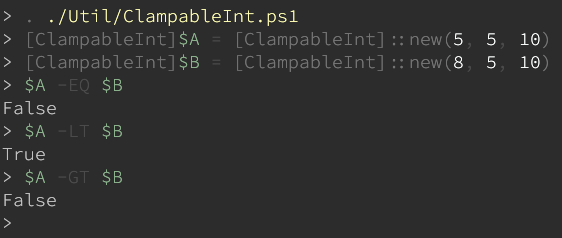
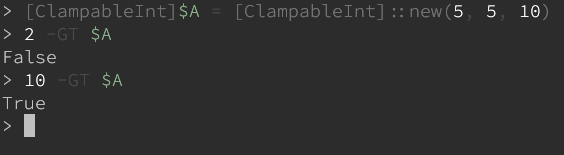
Finally, since this has gone on long enough, let’s examine the alternate route where we revisit operator overloading. What happens if we attempt this kind of comparison:
[ClampableInt]$A = [ClampableInt]::new(5, 5, 10)
2 -GT $A
Another oof.
With comparisons like this, you’re dealing with an implicit casting. Fortunately, there’s an operator for that called op_Implicit:
    Hidden Static [Int]op_Implicit(
        [ClampableInt]$Value
    ) {
        Return $Value.Value
    }
Note that if you want to reverse the operands in the comparison:
$A -GT 2You’ll need to overload the op_GreaterThan operator.
Leave a Reply